AirborneOps Learning Labs · AI fundamentals
AI basics for IT professionals
New to AI? This free eight-lesson path starts with core ideas, then covers data minimization, prompt injection, source checks, and safe AI use in IT work. Read and reflect at your own pace.
No account, subscription, or lab attempts are required.
AI architecture
How a Gemini AI environment fits together
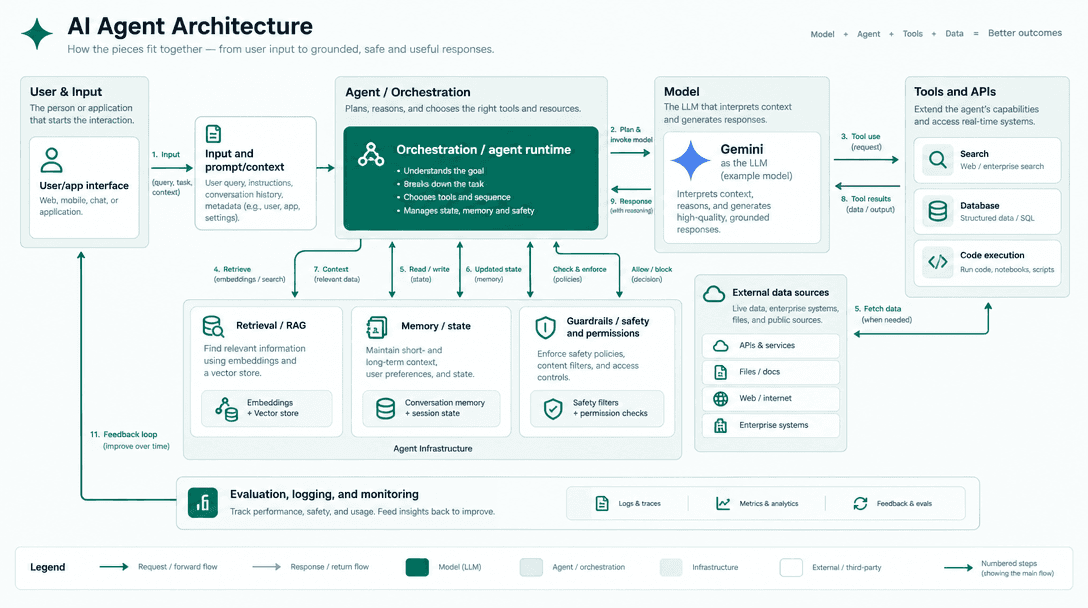
Follow one example request through the parts in this diagram, including what happens before the model sees the request and after it drafts a response.
Read the LLM architecture lessonSupplemental lesson · outside the eight-lesson path
Token Budgets and Context Windows
Learn how a model’s finite context capacity affects long prompts, and practice keeping the instructions and facts most important to an IT task.
Supplemental lesson · outside the eight-lesson path
Prompting or fine-tuning?
Compare the two approaches, see when each fits an IT task, and try a short decision exercise. This lesson is separate from the LLM architecture walkthrough.
Supplemental lesson · outside the eight-lesson path
Safe Tool Calling
Learn why a model’s tool call is only a proposal, and how an application checks permissions, validates inputs, and requires separate approval before a consequential IT action.
Supplemental lesson · outside the eight-lesson path
Prompt Injection and Untrusted Inputs
Recognize instruction-like text embedded in supplied content, keep it separate from trusted directions, and verify source material before acting. Includes a practical checklist and training-only example.
A guided starting point
Your eight-lesson path
Begin with basic terms, then practice clear instructions, minimize sensitive data, handle untrusted content, verify evidence, set safe boundaries, and evaluate a small workflow. Each lesson names what you should be able to do next.
- Start lesson
Lesson 01 of 8 · about 7 minutes
Start with the right mental model for AI
Learn how artificial intelligence, machine learning, and generative AI relate, and where each can help in an IT workflow.
You will learn to: Describe the difference between a rule-based task, a learned prediction, and generated content, then name the human decision that stays in control.
- Open lesson
Lesson 02 of 8 · about 8 minutes
Understand how a language model answers
See why a fluent answer can still be wrong, and what instructions, context, and connected sources contribute.
You will learn to: Explain why a language model can produce a plausible but unsupported answer and identify information you need to verify.
- Open lesson
Lesson 03 of 8 · about 8 minutes
Give the model a clear, bounded task
Build a prompt from the task, relevant context, constraints, and a reviewable output format.
You will learn to: Write a prompt that separates supplied facts from unknowns and asks for an output an IT professional can review.
- Open lesson
Lesson 04 of 8 · about 8 minutes
Data-Minimization Practices for LLM Applications
Reduce sensitive information in prompts, redact values that are not needed, and plan how conversation data is retained and protected.
You will learn to: Prepare a task-focused prompt that excludes unnecessary fields, redacts sensitive values, and applies clear access, retention, and deletion practices to any conversation data the application keeps.
- Open lesson
Lesson 05 of 8 · about 9 minutes
Handle prompt injection in tickets, email, and retrieved documents
Recognize instruction-like text in user prompts and supplied content, then keep untrusted data from overriding trusted instructions or exposing restricted information.
You will learn to: Identify a prompt-injection attempt in IT content, explain why it has no authority, and name controls that keep data and actions bounded.
- Open lesson
Lesson 06 of 8 · about 8 minutes
Ground and verify important answers
Use approved source material, trace important statements, and choose a safe response when the evidence is incomplete.
You will learn to: Check each consequential claim against an independent, current source and state uncertainty when the evidence is incomplete.
- Open lesson
Lesson 07 of 8 · about 9 minutes
Set safe boundaries for AI in IT work
Apply data-handling rules, treat supplied content as untrusted, and keep consequential changes under authorized review.
You will learn to: Name a data-handling boundary, an untrusted-input risk, and a human approval point in an AI-assisted workflow.
- Open lesson
Lesson 08 of 8 · about 9 minutes
Map and evaluate a small AI-assisted workflow
Bring the fundamentals together in a low-risk workflow with clear inputs, review, success criteria, and a fallback.
You will learn to: Sketch a small AI-assisted workflow with an approved input, bounded model task, human check, measurable quality criteria, and a fallback.
Continue learning
Ready for the practical lesson sequence?
The AI beginners track is a separate starting path. The practical lesson outline and its service-recovery preparation lesson remain available alongside it.